
Minified vs Pretty JSON: Differences and When to Use Each
One of the most commonly used data formats used for storing, exchanging and transmitting data is JSON (JavaScript Object Notation). Developers use JSON for APIs, web applications, configuration files and for data exchange between systems. There are, however, multiple styles of JSON for writing.
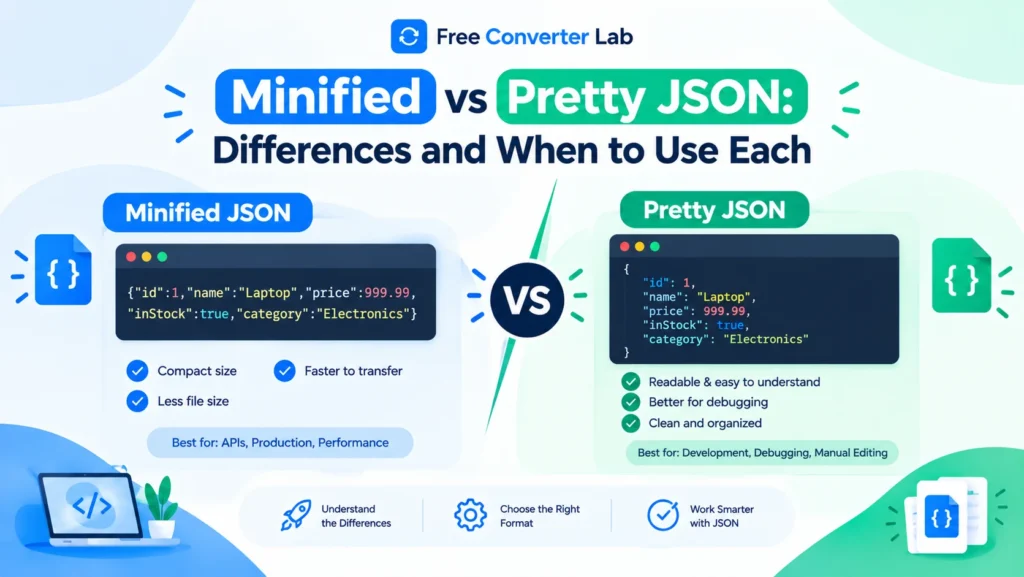
There are two popular formats, minified JSON and pretty JSON. Minified JSON eliminates extra spaces and line breaks for data to be more compact; pretty JSON adds spaces and line breaks for easier readability.
When you use JSON, you’ll want to use either the minified or pretty format for your different development, debugging, API response or production environments.
In this guide you will learn about the difference between minified JSON and formatted JSON, how each one works, when to use them and how to minify or beautify JSON online for free.
Pretty JSON : https://freeconverterlab.com/json-formatter/
What is Minified JSON?
Minified JSON is a shortened version of the JSON that has no unnecessary whitespace, line breaks, or indentation. The aim is to minimize text without altering the data.
Minified JSON is especially helpful in API calls, when storing small amounts of information, or when trying to decrease the payload size of a JSON message sent over a network.
Here is an example of minified JSON
This is a simple JSON object in minified form:
{“name”:”Alex”,”age”:28,”city”:”London”,”skills”:[“HTML”,”CSS”,”JavaScript”]}
All the elements are listed on a single line, causing the JSON file to be compact and not easily readable by humans.
Benefits of Minified JSON
- Smaller file size: If there are unnecessary spaces, they can be removed to reduce the amount of data being sent.
- Compact JSON: Can decrease network payload size.
- Ideal for API responses and data transfer: Minified JSON is frequently desirable for data exchange and API responses.
- Less visual clutter: Only the required JSON structure and values are outputted.
- Compact JSON: Easy automation – it is easy to use for scripts and data pipelines, especially for this purpose.
Limitations of Minified JSON
- Usually hard to read, when the data structure is big.
- Manual debugging is more difficult.
- It can be hard to examine nested objects and arrays.
- It might be harder to spot errors in a visual manner.
Minified JSON is perfect when it is more important to keep the output compact than to make it readable.
what is Pretty JSON?
Pretty JSON (or formatted JSON or pretty-printed JSON) is JSON that is formatted with indentation, spaces, and line breaks. This formatting allows the structure to be easier to grasp.
pretty JSON is often used by developers to write code, check the API response, read configuration files, and even for debugging applications.
Example of Pretty JSON
This is the same JSON object, formatted as shown:
{
“name”: “Alex”,
“age”: 28,
“city”: “London”,
“skills”: [
“HTML”,
“CSS”,
“JavaScript”
]
}
Each property is written on its own line, and the data is neatly ordered.
Benefits of Pretty JSON
- Readable format: Better visibility of properties and values.
- Easier debugging: Developers are able to view the objects and arrays more easily.
- Structured data: Nested data is easier to understand.
- Collaboration is easier: Formatted JSON is more readable and easier to maintain.
- Improved Learning Experience: The JSON syntax and structure is more approachable for novices.
Limitations of Pretty JSON
- Includes more characters due to spaces and indents.
- Can add larger files than minified JSON.
- May not be the best choice for applications with limited payload size.
Pretty JSON is best for development, debugging, documentation and when humans need to inspect data.
Minified vs Pretty JSON: Key Differences
Pretty vs minified JSON is about the formatting of the data, not about the content of the data.
Feature | Minified JSON | Pretty JSON |
Formatting | Compact, usually one line | Organized with indentation |
Readability | Harder to read manually | Easier to read |
File size | Usually smaller | Usually larger |
Debugging | More difficult visually | Easier |
API transmission | Useful for compact payloads | Useful for debugging and inspection |
Development | Less convenient for manual editing | More convenient for editing |
Production use | Often preferred for compact output | Useful when readability is needed |
Data structure | Preserved | Preserved |
Whitespace | Unnecessary whitespace removed | Whitespace added for clarity |
Best for | Data transfer and compact storage | Development and debugging |
The size difference will vary according to the content of the JSON and the indentation option. The gap is small if the JSON is very small.
What Is the Difference Between Minified and Pretty JSON?
The main difference between pretty JSON and minified JSON is the use of whitespace and formatting.
Consider this example.
Pretty JSON:
{
“product”: “Laptop”,
“price”: 850,
“available”: true
}
Minified JSON:
{“product”:”Laptop”,”price”:850,”available”:true}
Both examples have the same properties and values. Minified JSON: spaces and line breaks are omitted to reduce the size of the JSON file.Minified JSON: spaces and line breaks are stripped away to make the JSON file smaller.
Both formats contain the same JSON data, when processed properly. Property names and values, arrays, and nested objects should not be altered by formatting.
But, minification doesn’t mean removing all spaces characters from the JSON. The contents of strings must be preserved.
For example:
{“message”:”Welcome to our website”}
The word “to” should not be removed from the string and should be preceded by the word “Welcome” as shown.
Does Minifying JSON Reduce File Size?
Yes. Typically, JSON minification will eliminate extra white space, indentation, and line breaks from a JSON file.
For instance, if the JSON file is formatted with spaces and new lines, particularly if it has deeply nested objects and large arrays, there may be many new lines and spaces. To get compact JSON, this excess formatting can be removed by a minifier.
This can be used to minimize the size of JSON payloads in web applications and API communications.
Minification doesn’t delete data, however! Property names, values, arrays and objects remain untouched.
How Much Space Can You Save?
The space savings will vary with:
- The original size of the JSON document.
- Number of line breaks and spaces.
- The level of nesting of objects.
- The length of property names and values.
- How the text is formatted and indented.
If you’re working with a large, deeply nested JSON document, it’s better than a small object with just a couple of properties.
Be aware that JSON minification is not equal to compression. Minification strips formatting characters, and compression techniques like Gzip and Brotli can cut down on transfer even more. The compression method can be done automatically by web servers and browsers.
When should you use the Minified JSON?
Minified JSON comes in handy when you want to store, share over a network or use for production systems, where your data may be quite large.
1. Sending API Responses
The API typically provides web sites, mobile applications and other services with JSON information. Minified JSON can help to cut down on any extra whitespace that might be present in API responses.
For instance, a product API can provide product details, including availability, name, price and description. A compact response is one that does not send any indentation that the receiving application does not need.
2. Minimize the size of the JSON payload
With heavy use of large JSON objects in transfers, minification can make it smaller when not compressed.
This can be helpful for use in applications with the following characteristics:
- Product catalogs.
- Analytics data.
- Configuration objects.
- Large API responses.
- Structured records.
Consider compression of HTTP streams as well, for significant performance improvements.
3. Production Applications
Efficient data transfer is often a priority in production environments. Compact JSON may be helpful for transferring data between web applications, mobile clients and servers.
Minified JSON comes in particularly handy for software that will be processing the data, but not directly read by humans.
4. Storing Compact JSON
Minification can remove unwanted whitespace when storing a JSON file as a text file or moving it from one system to another.
When the file is already compressed or is compressed in a file format that compresses whitespace well, however, the storage can be marginal.
5. Automated Data Processing
Automated pipelines and scripts don’t require line breaks or indent in their processing of minified JSON. This depends on the tools and workflow used.
When Should You Use Pretty-Printed JSON?
When you want to view, edit or understand the data, pretty-printed JSON is the superior option.
1. Debugging JSON Errors
When developing APIs, JSON is typically checked for debugging API requests, responses from the server and application behavior.
The JSON format is readable, which simplifies retrieval of the correct property, the ability to see into nested objects more easily and the ability to compare values.
2. Developing Applications
Formatted JSON helps data structures to be more easily reviewed and maintained during development.
A JSON code formatter can structure the content in a consistent way, which makes it easier for the developers to understand the relationship between objects, arrays and properties while working with the code.
3. Reviewing API Responses
If an API returns a very large JSON response, pretty-printing the output can make it easier to inspect that output.
This works great for testing endpoints, checking on users, or looking at product data.
4. Editing Configuration Files
JSON is deployed in many applications as settings or configuration. These files will be easier to maintain with pretty JSON, as each property will be visible and organized.
Readability may be more important than minimizing whitespace for often edited configuration files.
5. Learning JSON Syntax
Objects, arrays, keys and values are better formatted on a separate line for beginners to understand JSON.
A readable format also will make it easier to show correct JSON formatting, nesting, and so on.
How to Minify JSON Online for Free
If you want to format your JSON into a smaller size, but don’t want to manually remove the spaces, you can use a free online JSON minifier.
Follow these steps:
- Open your browser and in it find a JSON minifier and formatter.
- Copy your JSON data from a file, editor or API response.
- Click in the input area and paste in the JSON.
- Choose the Minify or Compact option.
- Check the generated output for correctness.
- Copy the minified JSON or download it (if the tool supports this).
When preparing data for APIs, testing or production workflows, an online JSON minifier can save time.
Before pasting private records, API credentials, personal information or confidential business information, review the tool’s privacy policy for sensitive information.
How to Pretty Print JSON Online
A long and compact JSON string can be transformed into readable format by making use of a JSON beautifier online.
Follow these steps:
- Open a free online JSON Formatter.
- Copy and paste your minified JSON into the input.
- Click on Format, Beautify or Pretty Print.
- If an option is available, select an indentation size.
- Examine the created formatted JSON.
- Take a copy of the output that is readable for debugging, documentation, or development.
An online JSON beautifier will help you to inspect nested objects and arrays.
If you don’t want to paste into an online tool, you can use a local code editor that has JSON formatting capabilities.
How to Minify and Beautify JSON With One Tool
You can use a JSON minifier and formatter to easily alternate between compact and readable JSON, without having to manually modify the spacing.
The most common two operations a typical JSON beautifier and minifier can do are:
- Minify: Strip out all superfluous spaces to get a small JSON file.
- Beautify: Indents and breaks the lines to make it easier to read.
There are also some tools that support JSON validation, syntax highlighting, error detection and the copying / downloading of the output.
You can sometimes use a free online JSON minifier without any hassles. A developers’ JSON processor can be helpful for regular development purposes when it comes to validation and reviewing data from a single source.
For selecting a tool, be sure to find out if there are clear formatting options, accurate validation, copy-friendly options, and privacy information.
JSON Formatting vs JSON Minification: Does the Data Change?
If it’s done properly, formatting and minification in JSON will only affect how the data is displayed.
These two objects have the same JSON information:
Pretty format:
{
“status”: “success”,
“count”: 3
}
Minified format:
{“status”:”success”,”count”:3}
The values and property names are the same. A parser for JSON can be used to read either representation.
There are important things to keep in mind however:
- Embedded spaces within a string are preserved.
- String variables cannot be modified.
- The name of the property must not be changed.
- Arrays and nested objects should always be in order and structured.
- All JSON values (true, false and null) must be valid.
The order of keys in JSON objects is not significant for any meaning; the order of items in arrays is significant. If a system relies on the textual format or exact sequence of JSON—such as some digital signatures or hashing processes—then the parsing of equivalently-formatted data may not be sufficient to preserve the system’s integrity.
Common Mistakes to Avoid
The following are some common pitfalls to avoid when using minified and pretty JSON:
- Removing spaces inside strings
Data is not formatting but a space within a string. It can be changed by removing it.
- Confusing formatting with validation
A formatter formats valid json. A validator will determine if the JSON is valid according to the syntax or not. There are some tools that have both features, but they are different operations.
- Expecting minification to compress everything
Minification strips out any unnecessary whitespace; it doesn’t shorten property names or strip away data. Gzip/Brotli can offer further transfer-size savings.
- Editing minified JSON manually
It is easy to make mistakes when editing a large one-line JSON document. First, pretty-print the content so that the structure is understood.
- Sharing sensitive data with unknown tools
If not careful, one can paste passwords, private keys, access tokens, or confidential information into an online JSON formatter, but do not do so unless one is familiar with how the service treats the information.
Minified vs Pretty JSON: Which Format Should You Use?
It’s best to decide what you need to do and choose accordingly.
Use minified JSON for production API responses, data transfer, or storage (when easy-to-read text is not required).
Use pretty JSON when you want to inspect API responses, edit configuration files and debug code or make complex data easier to understand.
There is no need to select one format for good.You can’t select one format for good. Pretty JSON is used during development by many developers, and minified JSON is used when it is helpful to have a compact version.
Switching to a different style is easy and fast with a reliable JSON minifier and formatter. Use the format that best suits your workflow; and keep in mind that the correct format should maintain the underlying JSON data.
Frequently Asked Questions (FAQs)
1. What is the difference between minified and pretty JSON?
Minified JSON eliminates unnecessary whitespace, line breaks and indentation to produce simpler text. Pretty JSON formats the JSON in a pretty way, making it easier to read. Both can be used to describe the same set of JSON data.
2. Is minified JSON better than pretty JSON?
One is not necessarily superior to the other. Minified JSON is great for sending small amounts of data, and pretty JSON is great for debugging, editing and reading structured data.
3. Does minifying JSON reduce file size?
Yes. Minification is typically used to reduce the size of the uncompressed file by discarding spaces, indentations and line breaks. The savings depend on the amount of whitespace in the original json.
4. How can I minify JSON online for free?
Use the free online JSON minifier, paste your JSON and select the Minify or Compact option to copy the result. Always ensure that the output is a valid JSON before using it.
5. How do I pretty print JSON online?
Copy the JSON and format it online using a JSON parser, and choose Format, Beautify, or Pretty Print. Indents and breaks lines to make it easier to read.
6. Does JSON formatting change the actual data?
Formatting affects the appearance of whitespace on string values, but not the value itself. But it alters the original text when reformatted, which can impact workflows that rely on exact bytes, text comparisons, hashes or digital signatures.
7. Should I use minified JSON for API responses?
Minified JSON might be suitable in production API responses, as it removes all whitespace. Further payload size reduction can be achieved with HTTP compression. Pretty JSON might be more suitable for development time debugging API responses.
8. Can I convert minified JSON into readable JSON?
Yes. A beautifier for json online or a code editor with json formatting support. The tool can insert a tab and a line break so that the data can be shown in a readable format.
9. Is a JSON minifier the same as a JSON validator?
No. A minifier strips out any whitespace, and a validator verifies that the json is syntactically correct. Some online resources will have both features available.
10. What is the best free online JSON minifier and formatter?
Select a tool that minifies and pretty prints, validates JSON syntax, yields correct output and provides a clear explanation of its handling of the provided data. Use a trusted editor in the area or an offline tool instead in cases of sensitive information.
